Friday, 23 January 2015

Tips for marking online (inline grading)

The following tips are to help with the inline grading in LearnUCS, if you have any questions, please email elevate@ucs.ac.uk or talk to your Course Administrator

Tip 1: The Room.

If you are planning to spend a period of time marking, we'd suggest you book a small meeting room (which contains a large screen), reserve a laptop and VGA cable from Waterfront Reception. You can plug the laptop into the large screen. This will also overcome the issues of trying to mark within an open planned office.

Tip 2: Maximize the space of the inline grading area.

When you look at the inline grading area, much of he screen is contains information you don't need at the time, including navigation areas. You can maximise the inline grading area as outlined in the video


If you have any questions, please email elevate@ucs.ac.uk or talk to your Course Administrator

Wednesday, 21 January 2015

Additional Getting Started Guides

Over the last week we have been working on adding a couple more Getting Started Guides to our collections. The topics we have covered in the two guides below are:
  • Google Slides for Presentations
  • Creating Flow Diagrams
You can access the two guides below.


Tuesday, 13 January 2015

Evaluation of online courses: Dec 2014

Background

Learning Services released three online courses through the CourseSites platform at the end of December 2014. The courses where designed to provide an equivalent experience for the online learner as attending a getting started, one hour, face to face workshop.

The aim of this update is to start to draw a few reflections together, to allow us to re-visit the existing courses and enhance the design of the next wave due for release in March 2014. This self-reflection is a collaborative and transparent process.

I would like to thank the wider Learning Services Team for their work on these three courses, and the steps we have made.

For more information on how to enrol on the courses, see
For more background, see

Data Analysis (Did they come?)

In the first month, 29 people enrolled on the SOOC, of which 20 appeared to be UCS students, and 9 UCS staff. Of the UCS staff, 4 where members of Learning Services. Four people completed the courses and achieved their mozilla open badge. It didn’t appear we have any non-UCS registrations. An exploration of the gradebook suggested if people started a course (completed the first quiz), they tended to complete all quizzes on the course.

Criteria

The criteria used by the Elevate Team for reflecting on an online course as the online learner are:

Motivation
  • What are my motivation levels through the learning activity? Do I feel motivated to complete all the tasks? Do I feel engaged? Am I challenged as I complete the task? Is the language and content appropriate for the level (getting started, advanced)
Role of Feedback
  • How much feedback an I getting on the tasks? Do I feel I’m learning from the feedback I get? Does the feedback encourage me to complete more tasks?
Oncreen support and signposting
  • Do I know what to do? Are there clear, appropriate and time relevant instructions?
Screen design and layout
  • Is the screen design and layout consistent? Is it usable? Does the design hinder my chance of completing the tasks?
Interactivity and learning design
  • Am I simply reading and watching information or am I required to complete activities? Are the tasks and interactions the same type throughout the activity? What things are they making me do?
Content
  • Is the content OK? Are there areas which are not clear, or contain typos? Do all the links work?
In addition, individuals within the curriculum development team where asked to feedback. To promote feedback, and triangulate with the e-Learning Developers, they were provided a small range of stimulus questions:
  • how might we improve the learning design / flow?
  • Is the resource engaging?
  • Is the look and feel appealing?
  • Is it a good and effective learning experience?

Reflections

Role of feedback
  • The feedback is generic, irrespective of how you performed on the test / quiz. It would be good to use adaptive release to provided different feedback depending on performance.
  • There is a strong preference to multiple choice questions. So it would be useful to enhance authors awareness of the different question types available.
  • The feedback does not tend to be developmental, it is more, affirming the correct answer. It will be worth exploring with the course team the potential role of feedback.
Screen design and layout
  • The use of mark as reviewed, does create the issue of having to scroll more and more. Not sure if there is an obvious solution, but it is rather frustrating.
  • The use of embed screencasts are inconsistent, in terms of the size, and the presenter.
  • The embeded talking head videos lack engagement, they require text context on the screen, and could think through more effective use of props
  • The screen layout around Task 4 (Information searching), means it is difficult to complete the task.
Content
  • There appears to be a number of typos within the text. We should enhance the content management and sign content sign off processes.
Interactivity
  • There was a high level of interactivity within the resources, with the use of video and quiz questions, and marking as reviewed meant the learner was active in the process.

Where next for Learning Services?

We are expected to develop a number of online workshops to be rolled out in March (with the design phase in February). We'll follow a similar design process, with a kick off sprint. However, the focus of the sprint will include the quiz engine, and the role of feedback. It would also be very good to explore the potential of the students submitting a piece of work or reflection which will need assessing by members of Learning Services. We will also start to pull together and standardise the screencasts, videos and slides. The design and development phase will be completed with a set of student user tests. Of which the feedback will need to be applied before the courses are released.

Many of these lessons and ideas are transferable to other online course designs. For more information on how you might uses these lessons, please contact the Elevate Team (elevate@ucs.ac.uk).

Friday, 9 January 2015

Getting Started Guides

The Elevate Team, within Learning Services have just released a number of Getting Started Guides which are intended to help you get started with some of our key software. These are designed to complement our face to face workshops, and focus on the practical aspect, ie., how to set up an account, and which buttons to push to complete the first tasks.

The current titles are:


  • Reaping the rewards of social media: Getting started with Twitter
  • Mindmaps for organisation and reflection: Getting started with MindMup
  • Using YouTube to manage your multimedia resources


Here are the current set of guides, more will be released in the coming weeks.


We have improved the way you borrow clickers: Now in the Library

For your information, we are changing where you collect and return the clickers you've booked. This has been driven by the previous process starting to creak a little given the higher demand for clickers by staff and students. This new model will allow better monitoring of returns, and ensure the packs are complete.

The new process is as follows:
  1. Book the clickers and support through the web form (as previously)
  2. Collect and Return the clickers and dongles at UCS Ipswich Library Reception. You scan your set out as you would a book.
Therefore, you can not collect the Clickers from the Infozone, Waterfront Building

If you have any questions, please contact the Elevate Team (elevate@ucs.ac.uk)

Thursday, 8 January 2015

Would you like to know more around involving students in curriculum enhancement?

Would you like to know more around involving students in curriculum enhancement?

If the answer is yes, the JISC are launching a series of webinars to promote and share practice around student-staff partnership working and student engagement in curriculum enhancement and innovation in higher education and in FE and Skills.

The first webinar is on 27th January from 12:30-1:30 and will have two presentations, as well as time for questions and discussion. The presenters are;
  • Ellie Russell from the National Union of Students, who will outline the Principles of Student Engagement recently launched by The Student Engagement Partnership (TSEP).
  • Jim Pettiward from London Metropolitan University will be sharing his experiences from the Clued Up! Project -discussing how students and staff can explore and develop their digital literacies together.
Registration is free and to register please use the link: http://www.jisc.ac.uk/events/change-agents-network

The webinar will be recorded and the recording will be made available from the Change Agents’ Network blog: http://can.jiscinvolve.org

Monday, 5 January 2015

LearnUCS December 2014 Stats

Application Insight


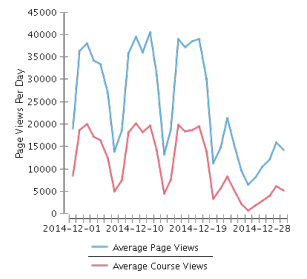
Below you will find the monthly stats for December 2014.  December is always one of those months that sits towards the bottom of a trough with regard to the numbers.

December is a month where we hit the end of a semester as well as have a two week break for the festive season.  Having said that, this months statistics are the best for any December since we moved to a managed hosted system in 2012.

Total Page Views
1,102,075
Average Page Views Per Day
Non course - 24,665
Course - 11,084
Most Active Date
Non Course - 40,531- 12 December 2014
Course - 24,446 - 12 December 2014


Application Metrics


Total Monthly Logins
32,310
Total Number of Courses
9710
Total Number of Active Courses
1714


With regard to the large difference between total number of courses and total number of active courses, we still have a large number of legacy courses that were migrated across from our self-hosted system that need to be manually disabled and removed.

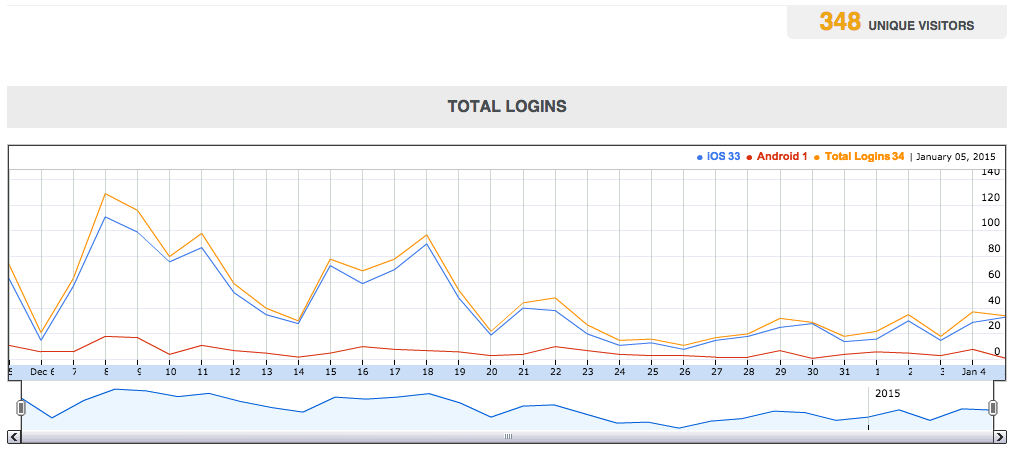
LearnUCS Mobile Statistics for 6 December 2014 to 5th January 2015


Total unique logins for the period was 348 with 1,531 logins by those 348 users.


iOS is still the most popular operating system for those devices by far with 301 of the 348 being on iOS, that is just over 86%.


This statistics post will become a regular feature on the blog, look out for January's numbers next month.