Showing posts with label LearnUCS. Show all posts

Monday, 18 May 2015

LearnUCS: Emergency Downtime

EMERGENCY DOWNTIME - MAY 20th - 2-4am

During our annual technical service review, our managed hosting technicians found a number of small tweaks that are required to continue the excellent system performance.

The interruption is expected to a maximum of 2 hours, this interruption will mean LearnUCS is unavailable for period of time between 2am and 4am.

Details:

Date: Wednesday 20th May 2015
Time: between 02:00 - 04:00
Downtime: 2 hours

It is advised that you do not access LearnUCS for this period.


Wednesday, 6 May 2015

LearnUCS: Service Disruption - 15 May 2015

We have been informed by our service provider for the hosted cloud environment for LearnUCS that they are expecting a service interruption during a maintenance window at the data centre.

The interruption is expected to last less than 15 minutes, this interruption will mean LearnUCS is unavailable for short period of time between midnight and 4am.

Details:

Date: Friday 15th May 2015
Time: between 00:00 - 04:00
Downtime: < 15 minutes

Apologies for any inconvenience caused during this service interruption

Tuesday, 5 May 2015

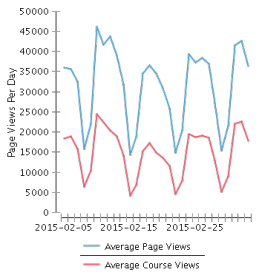
LearnUCS Stats: April 2015

Application Insight

Total Page Views1,255,934
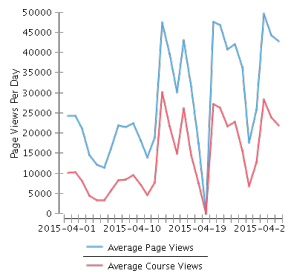
Average Page Views Per DayNon course - 29,070

Course - 14,237
Most Active DateNon Course - 49,611- 28 April 2015

Course - 30,740 - 14 April 2015


Application Metrics


Total Monthly Logins35,470
Total Number of Courses9780
Total Number of Active Courses1765

We have had continued fall in the number of active module this month, this follows the trend of the end of semester 1, with staff and students no longer requiring access to those materials.


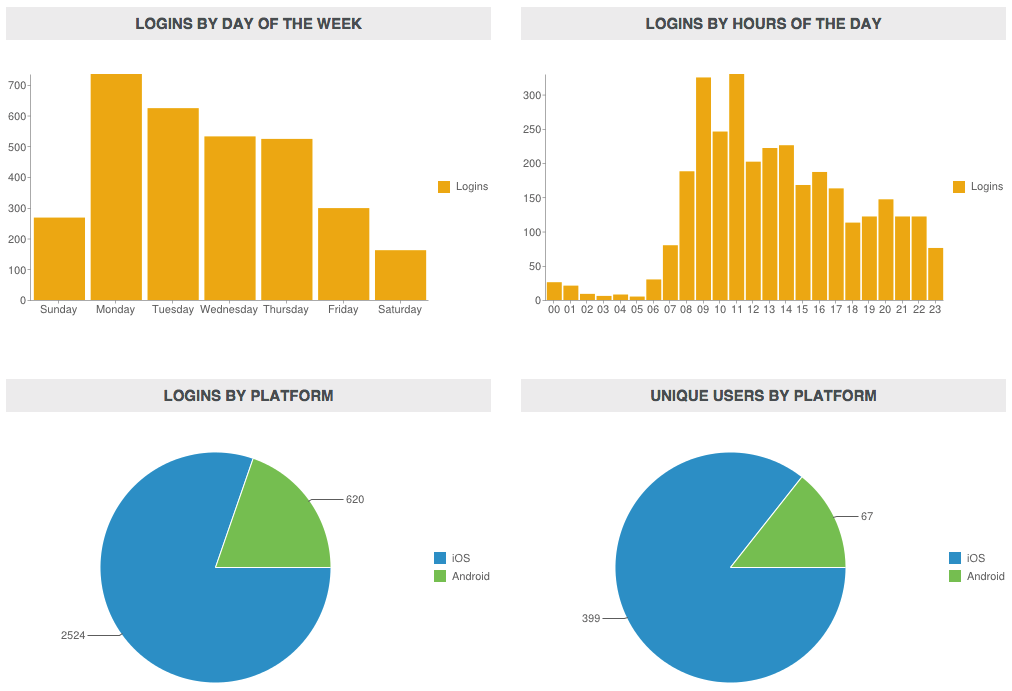
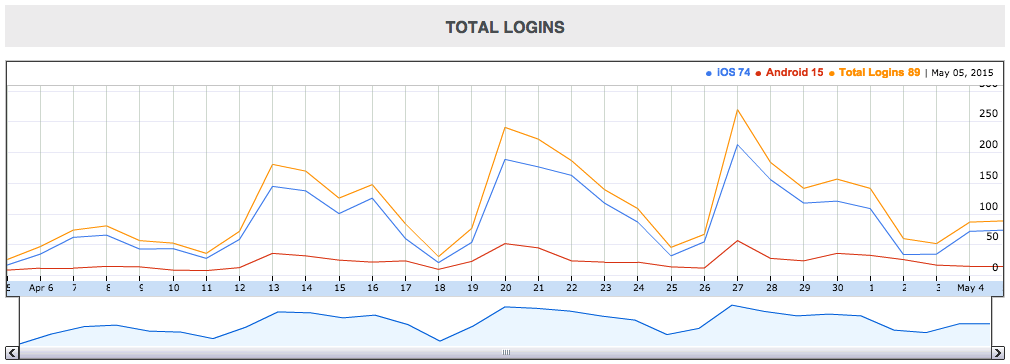
LearnUCS Mobile Statistics for 6 April 2015 to 5th May 2015

The stats below are use the built-in Blackboard mobile analytics, which uses the mobile service for the mobile application for its data.

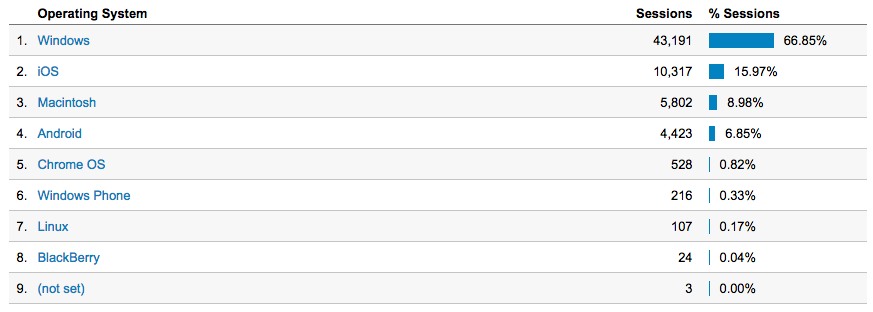
Since April we have been using Google Analytics on our Blackboard installation, this does not take into account those users using the mobile app. An interesting stats that Google shows us is that the second most used operating system of those accessing the web platform is iOS, a mobile operating system with 15.97% of all access.


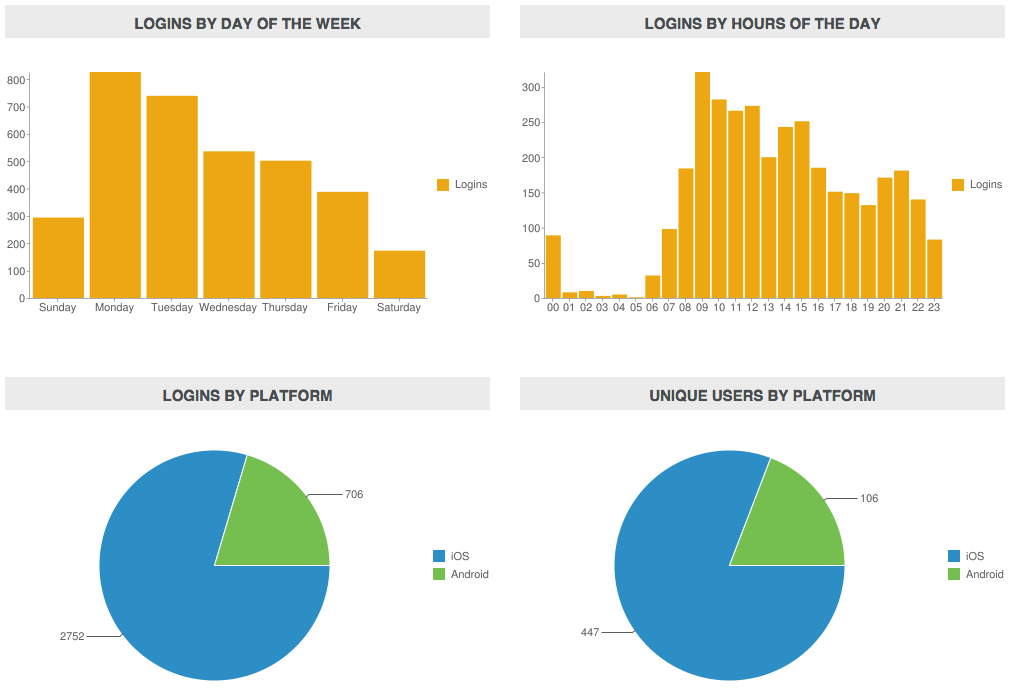
These stats below are for the Mobile Learn application only.

Total unique logins for the period was 553 with 3,458 logins.
iOS is still the most popular operating system for those devices by far.


Monday, 27 April 2015

Why don't you take our self-diagnostic online digital capabilities audit?

The Elevate Team have been working with a number of course teams to develop a digital capabilities auditing tool for lecturers. The intention is this acts as a developmental tool for the individual, and highlights potential areas for development at the team level.

A spin out of this development is the creation of an online version (using a sub set of questions), which allows you to compare your digital capabilities within LearnUCS with others. It also provided links to support material.

The online version is available from: http://goo.gl/zAlgZy

If you have any questions around running a Course Team Audit please contact the Elevate Team (elevate@ucs.ac.uk)


Image: With Thanks: https://farm6.staticflickr.com/5535/11747440176_8b961f9216_o.jpg (Free to Use and Share)

Wednesday, 1 April 2015

Improving your LearnUCS course: Our (Elevate Team) Top Tips

The Elevate Team have just released our top tips on how you can enhance your LearnUCS module design.

These aim to meet two distinct needs; to develop your skills to enhance the student learning experience on your LearnUCS module, and encourage you to align your course to the emerging minimum expectations across UK HEIs for the use of the Virtual Learning Environment in Teaching and Learning.

The learning design is based around, providing a rationale, the inclusion of an embedded video to demonstrate how to complete the task in LearnUCS, and where appropriate a link to the Blackboard provided support materials. You are encouraged to contact the Elevate Team to discuss how you might put these ideas into practice within your course. To facilitate this process the Elevate Team are revisiting how we position ourselves within course team areas. This aims to increase the opportunities for corridor conversations. The new approach will be piloted in the near future.

In the mean time, if you have any questions, please contact the us, elevate@ucs.ac.uk


Alternatively, 


With Thanks - Image - http://cdn2.hubspot.net/hub/276493/file-287927609-gif/note-top-tips.gif?t=1391618604000

Wednesday, 18 March 2015

Creating a Grading/Feedback Column for Offline Assessments

If you are wanting to use LearnUCS to give students grades and/or feedback for assessments taken offline, such as exams you will need to create a new Grade Centre column.

The video below shows how to create a new column that is not associated with an online submission process.


Friday, 13 March 2015

LearnUCS and Mobile Access

UCS has recently renewed its license with Blackboard, the virtual learning environment software supplier.

The license has been renewed until 2018, allowing UCS to continue to develop and enhanced its use of the market leading software solution.

One change in our license is that the Blackboard Mobile Services functionality has been included in the core product for the first time.  This means UCS staff and students can now take advantage of the mobile app, available for both smartphones and tablets completely free of charge.

One scenario that we are looking at taking advantage of the mobile functionality is for class-based work.  Students can create photos and/or videos during class time and they now have the ability of quickly and easily pushing that content into a discussion board or blog within the VLE.  This allows that content to be shared and seem immediately by all those on the course/module.

Below is a Blackboard video demonstration of the application.


If you would like to discuss how you could use the mobile application please get in touch with elevate@ucs.ac.uk

Monday, 9 March 2015

LearnUCS Stats: February 2015

Application Insight

Below is the continuation of the publishing of monthly statistics for LearnUCS. These stats cover the period from February 6th 2015 to March 5th 2015.

Comparing these numbers to last month we have had a very small dip, this, we believe is due to these stats being the month after the start of a new semester, with the initial flurry of both staff and students accessing the newly released modules.

Total Page Views1,342,625
Average Page Views Per DayNon course - 31,452

Course - 15,362
Most Active DateNon Course - 45,988- 10 February 2015

Course - 24,451 - 10 February 2015

Application Metrics


Total Monthly Logins36,275
Total Number of Courses9748
Total Number of Active Courses2017

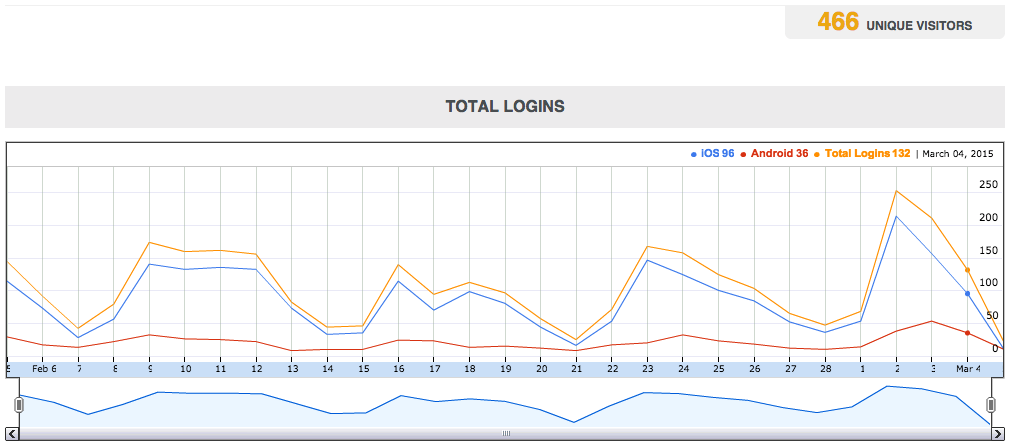
LearnUCS Mobile Statistics for 6 December 2014 to 5th January 2015

Total unique logins for the period was 466 with 3,144 logins.  This shows another significant rise in the use of the mobile app.  This may be to do with our new Blackboard License that includes the mobile app as a free download for users.

iOS is still the most popular operating system for those devices.


It will be interesting to compare these with the next set of statistics to see if there is continued growth.

Tuesday, 3 March 2015

Publishing Open Badges to Mozilla Backpack

We have had problems with publishing Open Badges to the Mozilla Backpack directly from LearnUCS (Blackboard), as have all other institutions.

Blackboard have been looking into the problem and have now applied a fix to our database, meaning we can now automate the awarding of an achievement and publishing the Open Badge to Mozilla Backpack.

We have one area already waiting to use this feature, if you would like to offer these skills based awards please speak with a member of the Elevate team, elevate@ucs.ac.uk


Thursday, 5 February 2015

LearnUCS: Copy Quizzes from One Module to Another

Quizzes are a very useful tool in LearnUCS.  The more complex the quiz, the longer they take to make.

For lecturers that use quizzes, there are two quick and easy ways of copying quizzes from one module to another, meaning you do not need to remake them each time.

The video below shows the two processes to copy them, one if you only want to copy one quiz, and the other if you have multiple.


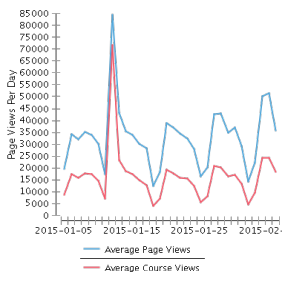
LearnUCS Stats: January 2015

Application Insight

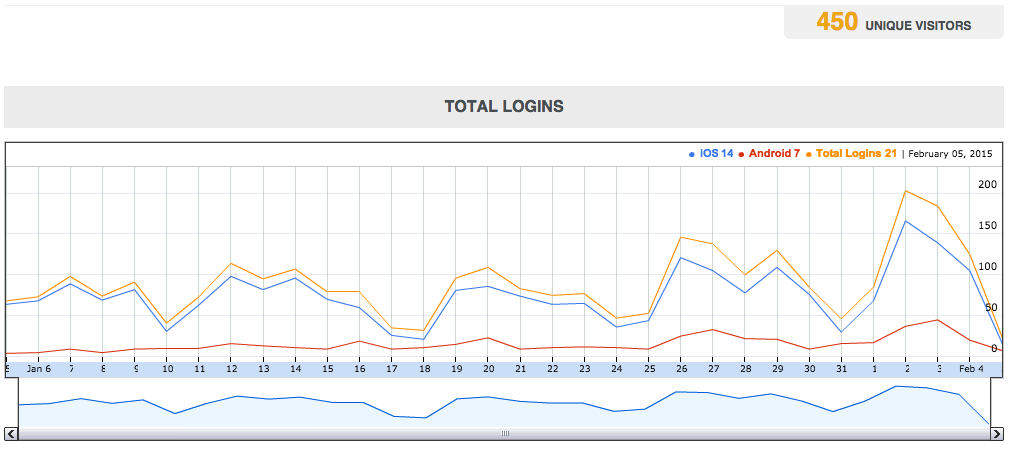
Below is the continuation of the publishing of monthly statistics for LearnUCS.  These stats cover the period from January 6th 2015 to February 5th 2015.

As mentioned last month, December is always a quieter month, due to the end of semester and the festive break.  Having said that, December 2014 was the busiest month for LearnUCS since we moved to a managed hosted system.

The stats set out below show a large jump from December as you would expect, but these are higher than we would have thought, especially the large spike on January 12th.  This spike is currently being investigated with the Academic Services team to see if it fits with the first day of a new intake and/or submission period.


Total Page Views1,593,635
Average Page Views Per DayNon course - 32,826

Course - 16,768
Most Active DateNon Course - 84,323- 12 January 2015

Course - 71,417 - 12 January 2015


Applications Metrics


Total Monthly Logins37,373
Total Number of Courses9718
Total Number of Active Courses2129

Our active course count has risen dramatically this month, by almost a quarter, this is due to the start of semester 2 and those module areas being unavailable until the lecturers are ready to release them.

LearnUCS Mobile Statistics for 6 January 2015 to 5th February 2015

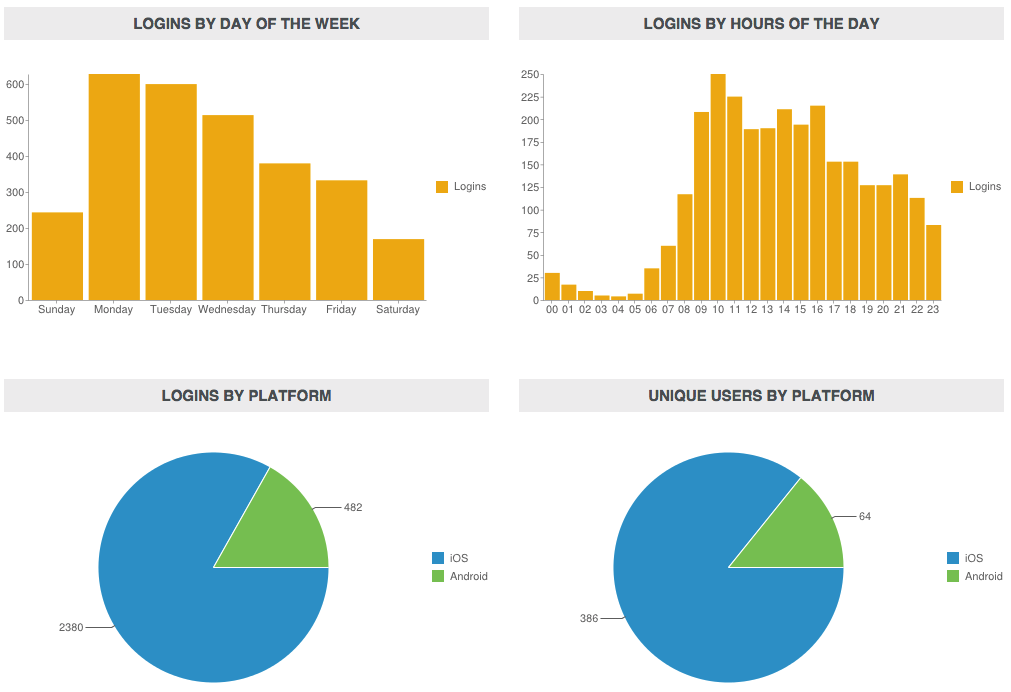
Total unique logins for the period was 450 which is over 100 more than last month, with 2862 logins by those 450 users.  That number of logins is almost double that of the previous month.

iOS is still the most popular operating system for those devices by far with 386 of the 450 being on iOS.


It will be interesting to compare these with the next set of statistics to see if there is continued growth.


Tuesday, 3 February 2015

LearnUCS Review 2015

Learning Services is about to start its LearnUCS (VLE) Review for 2015.

UCS has agreed to fund Blackboard as an externally hosted VLE solution for the next 3 years 2015 to 2017.

The starting point of this review will be: Blackboard (LearnUCS) is fit for purpose for Teaching, Learning and Assessment at UCS, and we should continue the license and externally hosting arrangement.

The intention of this review is to challenge the above assumption to ensure Blackboard meets UCS needs in the short term. The review will address;

Questions

Academic staff are being asked two questions for this review:

  • How are you currently using the VLE within your teaching, learning and assessment?
  • How would you like to use the VLE to enhance your teaching, learning and assessment?

The intention is to complete the review in a relatively short time period to answer the broad questions.

Data Collection Methods

Data collection will be undertaken in two formats during February 2015:
  • Face-to-face
  • Online Form
The face-to-face data collection will be undertaken by a member of the Learning Services team that is not connected to the LearnUCS service. This is to ensure a “neutral” collection of data with no bias.

A selection of twelve academic staff will be chosen to participate in the face-to-face interviews. The twelve staff will be selected from a pool of staff that are known to be:

  • Expert users
  • Intermediate users
  • Novice users
Alongside the twelve academic staff, each of the heads of department will also be asked to participate individually, Learning Services will also be able to attend department meetings.

An approach to staff at UCS Great Yarmouth to participate in the interviews as well as providing two academic staff for interview has also be made.

The intention is to also liaise with The Students’ Union to access the Student Council to ask two reworded questions in a student context. A fall back position for this is to speak with Course Reps directly.

An online form is available below to allow all other academic staff to participate if they choose:

LearnUCS Review 2015.

Analysis

Analysis of the data is to be undertaken during March 2015 with an initial report being available early April 2015.

http://mia.go.ug/sites/default/files/media/list-review-websites-ecommerce.jpg

Monday, 5 January 2015

LearnUCS December 2014 Stats

Application Insight


Below you will find the monthly stats for December 2014.  December is always one of those months that sits towards the bottom of a trough with regard to the numbers.

December is a month where we hit the end of a semester as well as have a two week break for the festive season.  Having said that, this months statistics are the best for any December since we moved to a managed hosted system in 2012.

Total Page Views
1,102,075
Average Page Views Per Day
Non course - 24,665
Course - 11,084
Most Active Date
Non Course - 40,531- 12 December 2014
Course - 24,446 - 12 December 2014


Application Metrics


Total Monthly Logins
32,310
Total Number of Courses
9710
Total Number of Active Courses
1714


With regard to the large difference between total number of courses and total number of active courses, we still have a large number of legacy courses that were migrated across from our self-hosted system that need to be manually disabled and removed.

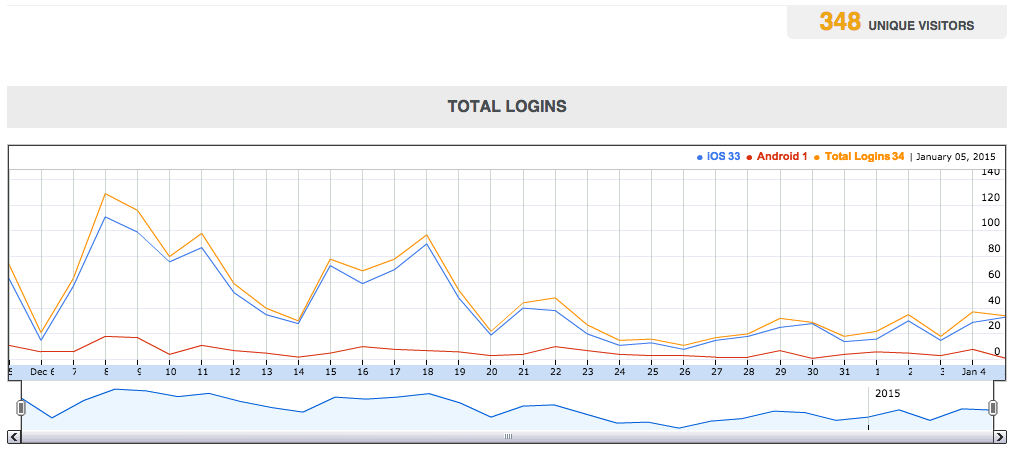
LearnUCS Mobile Statistics for 6 December 2014 to 5th January 2015


Total unique logins for the period was 348 with 1,531 logins by those 348 users.


iOS is still the most popular operating system for those devices by far with 301 of the 348 being on iOS, that is just over 86%.


This statistics post will become a regular feature on the blog, look out for January's numbers next month.

Tuesday, 28 October 2014

Blackboard Grader App - Overview

I have been aware of Blackboard working on a mobile application to allow grading of student work away from the traditional desktop computing environment for some time.

This first release of the application is now available in the Apple App Store and is called 'BB Grader'.

The app requires that we are using the Blackboard Mobile services building block, which we are, so the app has seamless integration with LearnUCS.

The app allows academic staff to access all of the assignment submission points from all of their modules in LearnUCS.  You are shown each submission point where you can see all submissions, when they were submitted and if they were late.

You are able to communicate with students from the app, as well as make notes into the retention centre.

If you have used the Inline Grading tools on a desktop computer you will be familiar with the tools in the app.  You can use the annotation tool to markup and grade a students submissions, as well as grading via Rubrics if you are using them in your modules.

A nice addition is the ability to record audio and/or video as feedback, this is very straight forward via the tablet.  Once you are happy with the grading you can send the grades back to the Gradecentre, which are then available immediately to either you or the student depending on Gradecentre column settings.

One thing I haven't seen/found yet is access to Safeassign reports, these currently need to be accessed via a browser if required.

Below is a short video overview of the app working.


Please get in touch with the Elevate team in Learning Services if you would like to see the app working in person.


Friday, 24 October 2014

Personal, Practical Support - Show & Tell with #Screencastify

I received a support email asking for help on a certain task in LearnUCS.  I was advised that I could reply via email rather than trying over the phone.

One email was sent back to confirm the required support.  Then rather than try and type a response explaining the options or the steps, I decided to make a simple video showing showing the steps to complete the task.

We have spoken about Screencastify as an extension to Google Chrome before but it is such a brilliant, easy tool to use that there was no choice, I would simply open a tab and record it.

The support request was for the different ways you could upload files into LearnUCS, I was aware there was more than one file, so I quickly made a video showing the different ways of uploading and sharing those files.

As this is such a quick and simple tool I could make the video personal to the academic requiring help, in the future I can simply remove/delete the video if necessary.

I wasn't too concerned about making a video too perfect, that could then be shared or used elsewhere, covering just generic information.  Screencastify is so simple, it makes these videos almost disposable.

As an example, the video is below:


Friday, 3 October 2014

LearnUCS Module Issue: Broken Links

We have become aware of an issue with a link that is present in all 2014/15 module areas in LearnUCS.

When a user clicks on the "Assignment Toolkit" link they are presented with an error page.

The issue is being looked at currently, in the mean time it is possible to access the Assignment Toolkit directly with the following link.

Sorry for any inconvenience this has caused, the Elevate Team will update this blog as soon as it knows more.

Friday, 12 September 2014

External Examiners: Briefing Statement

After a conversation with Quality and Enhancement Team, we thought it would be useful to update UCS External Examiners about the changes in LearnUCS, post our Summer 2014 upgrade.

The summer upgrade has introduced a number of enhancements to the system. However, these enhancements do not impact on how you access the system, or review the grade centre or access student submitted work. Any changes to the delivery by the course team due to these enhancements will be communicated with you by the Module Leader and/or Course Administrator.

The support for External Examiners on LearnUCS is not changing. Any questions you have concerning accessing the system, finding what you need, and support on the system need to be directed to the appropriate Course Administrator. The Module Leader will know the contact details for the Course Administrator.

The support package will be enhanced from previous years, including training sessions within the External Examiners Forum Meeting, and online materials.

If you have any questions, please contact the appropriate Course Administrator.

Friday, 5 September 2014

Staff Welcome Back: LearnUCS Surgeries

As many of you are aware we upgraded LearnUCS during July 2014. As part of this project we are rolling out a number of What are the new features in LearnUCS surgeries (30 minutes).

So if you'd like to know more about what is new and improved within LearnUCS, and how you might use this in your teaching and assessment, why not drop into one of the following short sessions (no booking required).

The sessions will be primarily looking at:
Times and location of surgeries:

  • Thursday 18th September 2014
    • 13.30 - 14.00
    • W415
  • Tuesday 23rd September 2014
    • 14.00 - 14.30
    • W415
  • Wednesday 1st October 2014
    • 15.00 - 15.30
    • W417
  • Friday 10th October 2014
    • 10.00 - 10.30
    • W418
If you have any questions about these sessions, or would like more information please email the Elevate Team in Learning Services (elevate@ucs.ac.uk).

Monday, 18 August 2014

LearnUCS 2014/15 Module Template - Focused yet Flexible

We have used module templates in LearnUCS for a number of years, they allow us to pre-build materials into all modules/courses that get released for the new academic year.

Once a template is created and then used to generate new module and course sites, those module are then set to that content.  UCS are a managed hosted client of Blackboard's, so we have no write access to the central databases, making global changes to modules/courses not possible.

Following a small review of the VLE, we were aware of feedback that was suggesting more timely, focused support for both staff and students.  Being timely, means that content needs to change at different points of the year.  This in turn makes templates difficult, as be definition they tend to be static once created.

This year the Elevate team have taken a different approach, meaning the content in the templates can be changed, globally.  We are able to be both focused and flexible, to achieve this we are using RSS feeds from this blog.

We have setup three keyword labels:
  • StudentsLearnUCS
  • StaffLearnUCSSupport
  • StudentSubmissionLearnUCS
We have a RSS feed building block in LearnUCS, this has been deployed three times in the template:
  • Assessment Folder
  • Help Folder
  • Staff EMA Support Folder (hidden from students)
Any blog post that uses one or more of those labels will mean that post is automatically displayed in the list of FAQs in one or more of the folders in every module/course.

The advantage of using RSS to control support page content is that we are able to amend, remove or add new content at any time to the 1300 module sites in LearnUCS.

We are able to make them timely, by re-ordering them or adding new content to the top of the list to coincide with assessment times.

By changing the date of the post to the blog, enables us to re-order the FAQs.

Below is an image showing how they are displayed in the module sites.


This year we have also introduced a new menu item, as shown below:


This set to "hidden", so it is only available to academic staff and not students.  This area again pulls in support material from this blog via RSS.  These materials are designed to offer support specifically for EMA - Electronic Management of Assessments.  These new materials were designed after an EMA review this summer, which showed that academic staff were asking for more support material.

Monday, 11 August 2014

2014/15 Modules Released

Modules for academic year 2014/15 have been released late this afternoon.  Academic staff should contact their course administrator for access to these newly released modules.

Please see the blog post here for help with rolling content over from a current module.

These modules now contain a menu item that is only available to staff, this area contains a list of FAQs that help support academic use of Electronic Marking of Assessment (EMA) features.